
Introducing vitallens-ios: The Swift SDK for the VitalLens API
We are releasing vitallens-ios, the official Swift SDK for the VitalLens API. This library joins our existing Python and JavaScript clients, making it straightforward to build robust, camera-based vital sign monitoring directly into your native iOS apps.
Why we built it
The VitalLens API is a stateless inference engine that requires a strict client-side preprocessing pipeline to minimize latency and ensure privacy.
vitallens-ios abstracts all of this away. It automatically manages the device camera, runs fast face detection using Apple's native Vision framework, formats the video payloads perfectly for the backend, and stitches the results together.
At the same time, it supports highly customizable integrations for apps with specific needs such as custom logic, UI, or existing camera pipelines.
Key Features
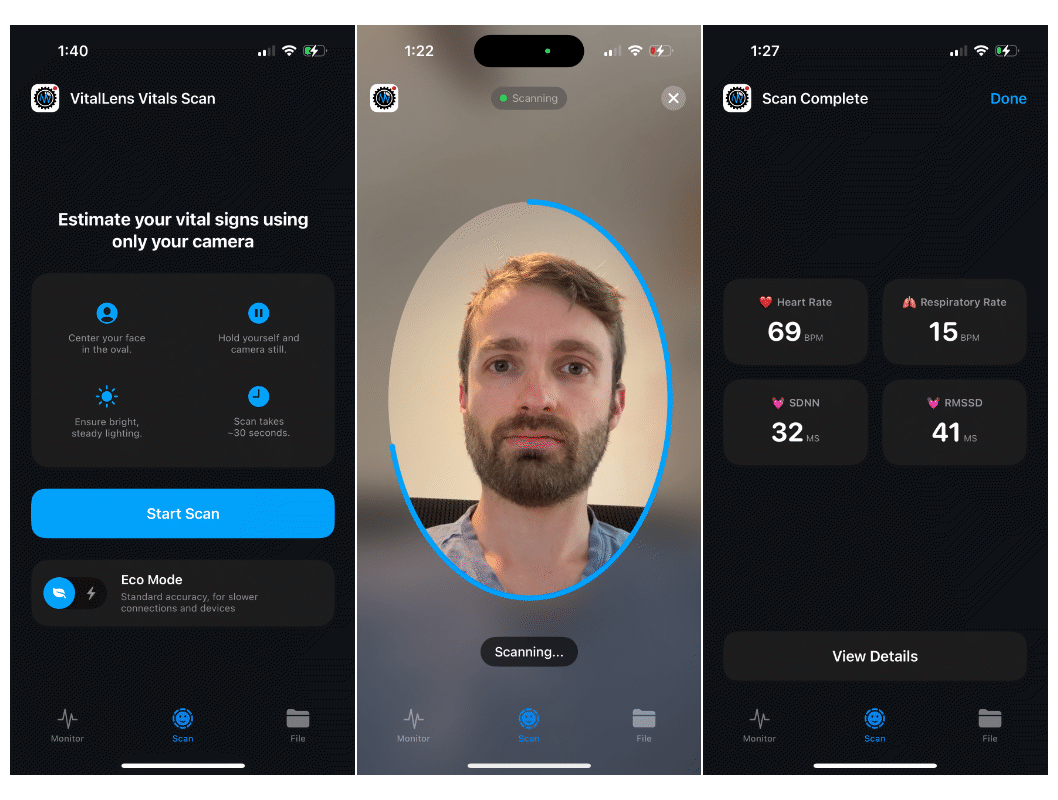
Drop-in SwiftUI Components: Get up and running instantly using pre-built views like VitalLensScanView (for guided, fixed-duration scans), VitalLensMonitorView (for continuous tracking), and VitalLensFileView (for file processing).
Flexible Input Sources: The SDK supports processing live AVCaptureSession streams directly from the device camera, as well as analyzing local video files.
Customizable Integration: The VitalLens class allows highly customizable integrations for apps with specific needs such as custom logic, UI, or existing camera pipelines.
Quickstart
Add the package via Swift Package Manager:
dependencies: [
    .package(url: "https://github.com/Rouast-Labs/vitallens-ios.git", from: "0.1.0")
]
The fastest way to test the integration is by dropping the 30-second scan view into your SwiftUI app:
import SwiftUI
import VitalLens
import VitalLensUI

struct ContentView: View {
    var body: some View {
        VitalLensScanView(
            apiKey: "YOUR_API_KEY",
            method: "vitallens"
        ) { result in
            if let hr = result.heartRate?.value {
                print("Final Heart Rate: \(hr) bpm")
            }
        }
    }
}
Get Started
Check out the source code on GitHub and read the full API reference in the documentation. If you don't have one yet, sign up here to get your free API key.